In [1]:
# make figures better:
font = {'weight':'normal','size':20}
matplotlib.rc('font', **font)
matplotlib.rc('figure', figsize=(9.0, 6.0))
matplotlib.rc('xtick.major', pad=10) # xticks too close to border!

import warnings
warnings.filterwarnings('ignore')

import random
import numpy as np
import scipy, scipy.stats

DSV Lecture 10

2014-02-13

James Bagrow, james.bagrow@uvm.edu, http://bagrow.com


HW 04

Mid-term project proposal

Please provide a 1-2 "page" ipython notebook describing what you want to do for a midterm project. What data do you want to analyze? What are the scientific questions you think you can address?

Pictures, figures, even rough preliminary analyses are welcome!

Due 2014-02-20 08:30:00


Last time:

Today's plan:

Recall from last time:

Linear regression in python

Two common ways to do linear regression:

In [2]:
import scipy, scipy.stats

# a few data points
X = [0,1,2,3,4,5,6,7,8]
Y = [19, 20, 20.5, 21.5, 22, 23, 23, 25.5, 24]

# let's fit a line:
slope, intercept, r_value, p_value, std_err = scipy.stats.linregress(X,Y)
#                 ^^^^^^^  ^^^^^^^  ^^^^^^^ ?

print "    slope =", slope
print "intercept =", intercept

# Here's our function:
line = [ slope*xi + intercept for xi in X]

# plot it up
plt.plot(X,line,'r-', linewidth=5)
plt.plot(X,Y,'o')
plt.xlabel("X"); plt.ylabel("Y"); plt.show()
    slope = 0.716666666667
intercept = 19.1888888889

In [3]:
def f_poly(x):
    return 3.4*x**2 - 12*x + 2.45768

X = np.linspace(0,10,100)
Y = [f_poly(x) + 10*np.random.randn() for x in X]

# get the best fit parameters:
beta1,beta2,beta3 = np.polyfit(X,Y, 2) # <-- 2 means quadratic

# generate and draw the line:
line = [beta1*x**2 + beta2*x + beta3 for x in X]

plt.plot(X,line,'r-', linewidth=5)
plt.plot(X,Y,'o')
plt.xlabel("X"); plt.ylabel("Y"); plt.show()

Nonlinear least-squares regression

In [4]:
from scipy.optimize import curve_fit

def func(x, a, b, c):
    """Our little nonlinear function."""
    return a*np.exp(-b*x) + c


# our measured data with noise:
X = np.linspace(0,4,100)
Y = func(X, 2.5, 1.3, 0.5) + 0.2*np.random.normal(size=len(X))

# nonlinear fitting!!!!!!!!!
betasEXP, cov = curve_fit(func, X, Y)
#         ^^^ ?

plt.plot(X,Y, 'o')
plt.plot(X, func(X, *betasEXP), 'r-', linewidth=5)
plt.xlabel("X variable"); plt.ylabel("Y variable")
lstrEXP = "%0.2f exp(-%0.2f x) + %0.2f" % tuple(betasEXP)
plt.legend(["data", lstrEXP]); 
plt.show()

Comparing models

In [5]:
def func2(x, a, b, c):
    return a*x**2 + b*x + c

# do the fit with nonlinear regression, but we could also use
# polyfit:
betasPLY, pcov = curve_fit(func2, X, Y)

plt.plot(X,Y, 'o')
plt.plot(X,  func(X, *betasEXP), 'r-', linewidth=3)
plt.plot(X, func2(X, *betasPLY), 'g-', linewidth=3)
plt.xlabel("X variable"); plt.ylabel("Y variable")
plt.legend(["data", "f1(x)", "f2(x)"]); plt.show()
In [6]:
# recycling fits from previous cells:

Xtest = np.linspace(4,8,100)
Ytest = func(Xtest, 2.5, 1.3, 0.5) + 0.2*np.random.normal(size=len(X))

Xall = np.append(X, Xtest)

# plot data:
plt.plot(X,Y, 'o')
plt.plot(Xtest,Ytest, 'sc')

# plot fits:
plt.plot(Xall,  func(Xall, *betasEXP), 'r-', linewidth=3)
plt.plot(Xall, func2(Xall, *betasPLY), 'g-', linewidth=3)

# clean it up a bit:
plt.xlabel("X variable"); plt.ylabel("Y variable")
plt.legend(["Training data", "Testing data", "f1(x)", "f2(x)"], 'upper left')
plt.ylim([0, 6]);plt.show()

Quantifying the fit

We want a number measuring how good the curve is to the data. Is it plausible that the data come from our equation (with some noise), or is there probably no connection.

In [7]:
X = np.linspace(0,10,50)
Y = [np.random.randn()+3 for x in X] # no relationship to x:

plt.plot(X,Y, 'o')
plt.xlabel("X variable"); plt.ylabel("Y variable")
plt.show()

There are many ways to measure this. A common way is the correlation coefficient \(R\). In this context we want to measure \(R^2\), aka the coefficient of determination.


Here is the intuition behind \(R^2\), illustrated for a simple line:

If there is no relationship then we know our equation for \(y\), \(y=f(x)\), will not contain \(x\). This must be \(y = \beta_1\), a constant. And the \(\beta_1\) that minimizes the error for this function is just the average of all the \(y_i\), denoted \(\bar{y}\).


The \(R^2\) is a number that lets us measure how much better our linear function is from the constant function. How much better is our linear function from the independent function. ***

To make this comparison we need to compute the sum of the squared errors for the linear function \(y = f(x)\) and the constant function \(y = \bar{y}\) :

\[S_\mathrm{linear} = \sum_i \left(y_i - f(x_i)\right)^2\]

\[S_\mathrm{constant} = \sum_i \left(y_i - \bar{y}\right)^2\]

If the linear fit is great, and the constant "fit" is bad, then \(S_\mathrm{linear} \ll S_\mathrm{constant}\).


Wikipedia provides a great picture:
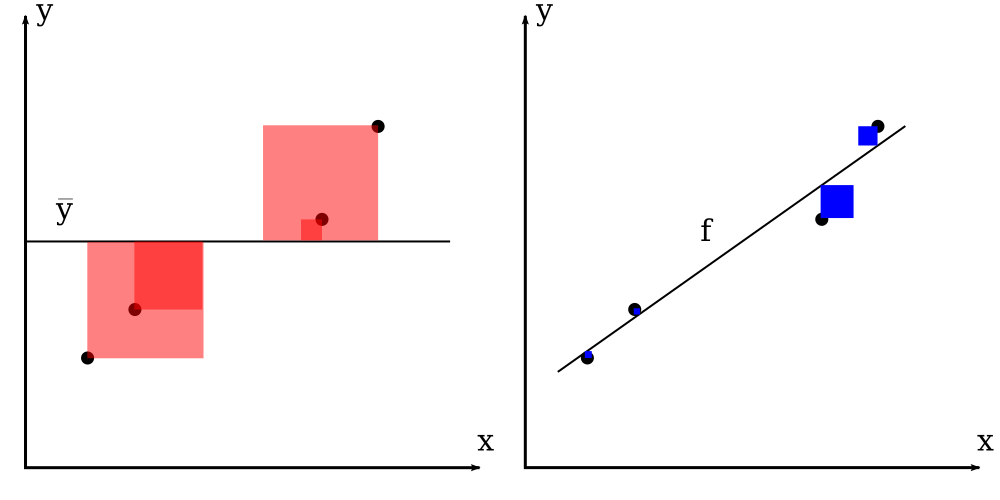
The boxes illustrate the squared errors as areas.

Then the \(R^2\) is just:

\[ R^2 = 1 - \frac{\color{blue}{S_\mathrm{linear}} }{\color{red}{S_\mathrm{constant}}}\]


How to compute this in python? For linear regression we can use scipy. Here's some examples:

In [8]:
# fake data!
x = np.random.random(10)
y = np.random.random(10)

ybar = np.mean(y)

slope, intercept, r_value, p_value, std_err = scipy.stats.linregress(x,y)
#                 ^^^^^^^

plt.plot(x,y,'o')
plt.plot(x, slope*x + intercept, 'r-', linewidth=5) 
plt.plot([min(x),max(x)],[ybar,ybar], linewidth=4)
plt.xlabel("X variable"); plt.ylabel("Y variable"); plt.show()

print "R^2 =", r_value**2
R^2 = 0.202302540126

In [9]:
# more fake data!
x = np.random.random(50)
y = 0.24*x + np.random.random(50)*0.15
#   ^^^^

ybar = np.mean(y)


slope, intercept, r_value, p_value, std_err = scipy.stats.linregress(x,y)

plt.plot(x,y,'o')
plt.plot(x, slope*x + intercept, 'r-', linewidth=5) 
plt.plot([0,1],[ybar,ybar], linewidth=4)
plt.xlabel("X variable"); plt.ylabel("Y variable"); plt.show()

print "R^2 =", r_value**2
R^2 = 0.69039551242

In [10]:
# more fake data!
x = np.random.random(70)
y = -4*x + np.random.random(70)

slope, intercept, r_value, p_value, std_err = scipy.stats.linregress(x,y)

plt.plot(x,y,'o')
plt.plot(x, slope*x + intercept, 'r-', linewidth=5) 
plt.xlabel("X variable"); plt.ylabel("Y variable"); plt.show()

print "R^2 =", r_value**2
R^2 = 0.936385183565


***

The \(R^2\) should be small when there's no relationship, but with only 10 points it may appear by chance!

In [11]:
list_Rs = []
for _ in range(10000):
    x = np.random.random(10)
    y = np.random.random(10)

    slope, intercept, r_value, px, serr = scipy.stats.linregress(x,y)
    
    list_Rs.append(r_value**2)

plt.hold(True)
plt.hist(list_Rs,100)

plt.annotate('Wow!', xy=(0.7, 100), xytext=(0.6, 500),
            arrowprops=dict(facecolor='black', shrink=0.05),
            ha="center", va="center",
            )


plt.xlabel("R^2"); plt.ylabel("Number of occurrences"); plt.show()

Question: Why is it called \(R^2\)?

Correlation coefficient

Given a dataset consisting of XY-data, we can compute a number \(r\) by comparing the \(x_i\)'s and the \(y_i\)'s to their means \(\bar{x}\) and \(\bar{y}\):

\[r = \frac{\sum^n _{i=1}(x_i - \bar{x})(y_i - \bar{y})}{\sqrt{\sum^n _{i=1}(x_i - \bar{x})^2} \sqrt{\sum^n _{i=1}(y_i - \bar{y})^2}}\]

This is known as the correlation coefficient or the Pearson correlation coefficient or the Pearson product-moment correlation coefficient.

Some examples:

In [12]:
f, (ax1, ax2, ax3) = plt.subplots(1, 3, figsize=(12,3))
#plt.subplots_adjust(left=0.2, right=0.6, top=1, bottom=0)
plt.subplots_adjust(wspace=0.3)

### RANDOM ###
x = np.random.random(10)
y = np.random.random(10)

slope, intercept, r_value, p_value, std_err = scipy.stats.linregress(x,y)
ax1.plot(x,y,'o', x, slope*x+intercept, 'r-')
ax1.set_xlabel("X"); ax1.set_ylabel("Y")
ax1.set_title("r = %f" % r_value)


### SOME LINEAR DEPENDENCE ###
x = np.random.random(50)
y = 0.24*x + np.random.random(50)*0.15

slope, intercept, r_value, p_value, std_err = scipy.stats.linregress(x,y)
ax2.plot(x,y,'o', x, slope*x+intercept, 'r-')
ax2.set_xlabel("X"); ax2.set_ylabel("Y")
ax2.set_title("r = %f" % r_value)


### SOME LINEAR DEPENDENCE ###
x = np.random.random(70)
y = -4*x + np.random.random(70)

slope, intercept, r_value, p_value, std_err = scipy.stats.linregress(x,y)
ax3.plot(x,y,'o', x, slope*x+intercept, 'r-')
ax3.set_xlabel("X"); ax3.set_ylabel("Y")
ax3.set_title("r = %f" % r_value); 


for ax in [ax1,ax2,ax3]:
    for item in (ax.get_xticklabels() + ax.get_yticklabels()):
        item.set_fontsize(12)
plt.show()

Our original question:

These two equations look very different:

\[ R^2 = 1 - \frac{\sum_i \left(y_i - f(x_i)\right)^2}{\sum_i \left(y_i - \bar{y}\right)^2} ~~~~~~~ \mbox{(where $f(x)$ is a line)}\]

vs.

\[r = \frac{\sum^n _{i=1}(x_i - \bar{x})(y_i - \bar{y})}{\sqrt{\sum^n _{i=1}(x_i - \bar{x})^2} \sqrt{\sum^n _{i=1}(y_i - \bar{y})^2}}\]

But it can be shown that squaring the correlation coefficient gives us the coefficient of determination (\(r^2 = R^2\)).


More examples and gotchas.

\(r^2\) can be interpreted by how much variance (the fraction of variance) in \(y\) is explained by a linear function of \(x\).

Few data are exactly explained by a linear function, but we can always compute the \(r^2\) value given the \((x_i,y_i)\) pairs.


Anscombe's quartet:

All four datasets have \(r=0.816\)!

In [13]:
X = np.random.random(180)*4 - 2
Y = 0.6*X + np.random.randn(180)*0.4

# reset fig size from prev subplot:
matplotlib.rc('font', **font)
matplotlib.rc('figure', figsize=(9.0, 6.0))
matplotlib.rc('xtick.major', pad=10) # xticks too close to border!


# fit a line to all the data:
m, b, r_all, p, serr = scipy.stats.linregress(X,Y)


# fit a line to a small part of the data (x between 0 and 1):
XY_red = [ (x,y) for x,y in zip(X,Y) if 0.0 < x < 1.0 ]
Xr,Yr = zip(*XY_red)

m, b, r_red, p, serr = scipy.stats.linregress(Xr,Yr)

plt.plot(X,Y,'o', Xr,Yr,'rs')
plt.fill_between([0,1],[-2,-2],[2,2], facecolor='grey',alpha=0.3)
plt.ylim(-2,2)
plt.xlabel("X");plt.ylabel("Y");plt.show()

print "    r (all) =", r_all
print "r (reduced) =", r_red
    r (all) = 0.870458448365
r (reduced) = 0.424488413882

Robustness and confidence of a fit

Given a (linear) fit, how much of your result is due to the data itself. Could a single outlier have tricked you?
How far off is our estimated fit parameter \(\beta\) from the true value?
How can you quantitatively tell that there is really a (linear) relationship between \(x\) and \(y\)?

Bootstrapping

Suppose I've fitted the line \(y = m x + b\) to the data. I get a slope of \(m = 1.0245\) and I have a good reason to suspect (hypothesis!) the system is really follows a function with a slope of 1. Is it right? What if I measured \(m = 1.2045\)?


A simple way to answer this is to get a bunch more data, say from 100 experiments, measure \(m\) for each one, and make a histogram of all the slopes. If this shows a sharp peak around 1 that supports the hypothesis. If our first measurement was a fluke we would see many other experiments with slopes far from 1.

When faced with this situation we can turn to resampling techniques to FAKE more experiments out of our single bag of data.

Cross-validation

K-fold cross-validation Randomly chop the data into \(K\) equally-sized subsamples. Perform your analysis (regression in this case) on a sample containing \(K-1\) of the subsamples grouped together, holding out the last subsample. Repeat this \(K\) times holding out each subsample once. This gives you \(K\) values of the slope, in this case.

Bootstrapping

Here's a clever trick:

You can generate a "new" dataset by sampling randomly from the original data with replacement. The same point or value can be drawn more than once! If values are common in the original dataset they will be more likely to be sampled in each bootstrap dataset, capturing the underlying population distribution but allowing random variation. This is a little ad hoc.

Here's an example using the mean of a collection of measurements:

In [14]:
mu = 2.5
measurements = mu + np.random.randn(100)

print "mean =", np.mean(measurements)
mean = 2.52675168797

Let's do 100 bootstrap replicates and see how broadly their means are distributed.

In [15]:
n = len(measurements) # size of dataset

list_bootstrap_means = []
for _ in range(100):
    bs_measurements = [ random.choice(measurements) for _ in range(n) ]
    
    bs_mean = np.mean(bs_measurements)
    list_bootstrap_means.append(bs_mean)

plt.hold(True)
plt.hist(list_bootstrap_means)
plt.plot([mu,mu], [0,15], 'r-', linewidth=5)
plt.xlabel("Means"); plt.ylabel("Count"); plt.show()

Well, it looks like the true value is inside the distribution of means, but are the means in our replicates spread widely?

In [16]:
n = len(measurements) # size of dataset

list_bootstrap_means = []
for _ in range(5000):
    bs_measurements = [ random.choice(measurements) for _ in range(n) ]
    
    bs_mean = np.mean(bs_measurements)
    list_bootstrap_means.append(bs_mean)

plt.hold(True)
plt.hist(list_bootstrap_means, 60)
plt.plot([mu,mu], [0,150], 'r-', linewidth=5)
plt.xlabel("Means"); plt.ylabel("Count"); plt.show()

Hmm, it looks like the bootstrap data are obeying a gaussian (normal distribution). We can work out the mean and variance of this distribution:

In [17]:
mean_means = np.mean(list_bootstrap_means)
stdv_means = np.std(list_bootstrap_means)

print "mean, stdv =", mean_means, stdv_means

print np.percentile(list_bootstrap_means,5)
print np.percentile(list_bootstrap_means,95)
mean, stdv = 2.52670894244 0.09419644809
2.37074461801
2.67832582306


Bootstrapping can also be used for XY-data. Return to our original example.

We've got some XY-data and we've estimated a slope and an intercept for a linear function's fit.

Can we make a clain about what the true slope is, given the slope we got from our data?

  1. Bootstrap the XY-pairs
  2. Fit each bootstrap dataset to get a slope
  3. ??? (actually, histogram)
  4. profit

First let's plot the original scatter, and 100 fitted lines for 100 bootstraps:

In [18]:
# fake xy data:
a = -0.5
b = 1
n = 200
x = np.random.randn(n)
y = a*x + b + 1*np.random.randn(n)


plt.plot(x,y,'o', zorder=2)
data = zip(x,y)
n = len(data)


list_slopes = []
for _ in range(100):
    sampled_data = [ random.choice(data) for _ in range(n) ]
    x_s,y_s = zip(*sampled_data)
    x_s = np.array(x_s)
    y_s = np.array(y_s)
    
    m_s, b_s, r, p, err = scipy.stats.linregress(x_s,y_s)
    ymodel = m_s*x_s + b_s
    list_slopes.append(m_s)
    
    plt.plot(x_s,ymodel,'r-',zorder=1)

#plt.fill_between(xd, yl,yu, alpha=0.3, facecolor='blue',edgecolor='none',zorder=5)
plt.xlabel("X"); plt.ylabel('Y');plt.show()

It's very interesting that there's a sort of "bow-tie" shape to the different lines. This is due to a non-trivial relationship between the slopes and intercepts.

Here's the distribution of slopes:

In [19]:
plt.hist(list_slopes)
plt.xlabel("slopes");plt.ylabel("counts");plt.show()

This process let us computationally estimate a CONFIDENCE INTERVAL on the slope.

A confidence interval let's us define the range of numbers over which we are, say, 95% confident the true value lies. Another way of thinking about this is that our result (whatever it is) lets us estimate that there is a 95% chance the true value lies in this range.


For linear regression we can write down exactly what the confidence intervals are, for the slope, intercept, etc. If we assume errors are normally distributed this is exactly.

In [20]:
def linregress_CIs(xd,yd,conf=0.95):
    """Linear regression CIs FTW!"""
    alpha=1.-conf   # significance
    n = xd.size   # data sample size
    x = numpy.linspace(xd.min(),xd.max(),100)
        
    # Predicted values from fitted model:
    a, b, r, p, err = scipy.stats.linregress(xd,yd)
    y = a*x+b
    
    sd = 1./(n-2.)*np.sum((yd-a*xd-b)**2)
    sd = np.sqrt(sd)
    sxd = np.sum((xd-xd.mean())**2)
    sx  = (x-xd.mean())**2
    
    # quantile of student's t distribution for p=1-alpha/2
    q = scipy.stats.t.ppf(1.-alpha/2, n-2)
    
    # get the upper and lower CI:
    dy = q*sd*numpy.sqrt( 1./n + sx/sxd )
    yl = y-dy
    yu = y+dy
    
    return yl,yu,x
In [21]:
yl,yu,xd = linregress_CIs(x,y)

plt.plot(x,y, 'o')
plt.plot(x,a*x+b,'k-')
plt.fill_between(xd, yl, yu, alpha=0.3, facecolor='blue',edgecolor='none')
plt.show()

(The blue area is a 95% confidence interval on the line. It does not mean that 95% of the data points fall inside the blue area.)

How does this prediction compare to the bootstrap:

In [22]:
# plot the original data again
plt.plot(x,y,'o', zorder=2)

# plot the bootstrap lines again:
for _ in range(100):
    sampled_data = [ random.choice(data) for _ in range(n) ]
    x_s,y_s = zip(*sampled_data)
    x_s = np.array(x_s)
    y_s = np.array(y_s)
    
    m_s, b_s, r, p, err = scipy.stats.linregress(x_s,y_s)
    ymodel = m_s*x_s + b_s
    
    plt.plot(x_s,ymodel,'r-',zorder=1)

# plot the CI:
plt.fill_between(xd, yl,yu, alpha=0.4, facecolor='blue',edgecolor='none',zorder=5)
plt.xlabel("X"); plt.ylabel('Y');plt.show()

Takeaway

Today we quantified the accuracy of our fits using \(R^2\).


We introduced a nice procedure (bootstrapping) for estimating the range of our fit parameters (or other measured statistics) when we are in a data-poor area.


We did not answer the question: Is really a (linear) relationship between \(x\) and \(y\)?